 BuildCAD
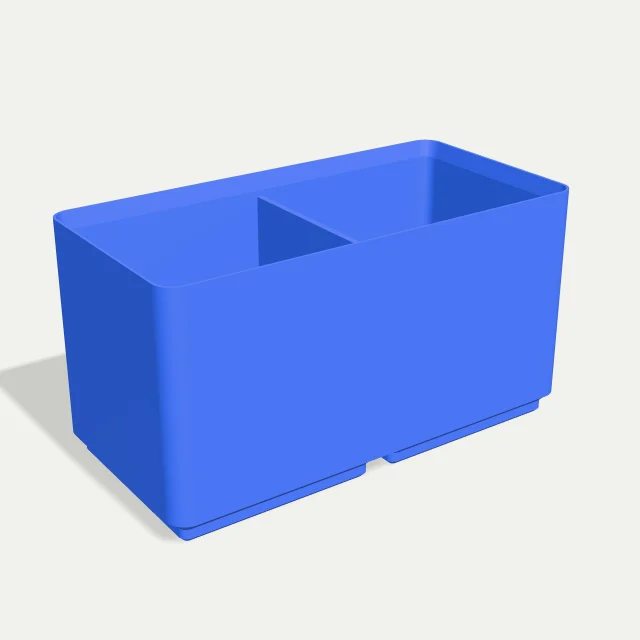
From an empty drawer to a useful layout
How do I generate Gridfinity parts?
Measure your objects, the room needed to lift them out, and the usable drawer height. Select Storage bin, choose its footprint, then set height, dividers and wall thickness. Select Generate model. Rotate the finished preview and check its dimensions before downloading.
Select Baseplate for the receiving grid that locates bins. Generate individual parts and arrange copies in your slicer. Rebuilds use no AI credits. Changed numbers remain drafts until you generate again; the preview keeps the last built part visible.
How do the 42 mm grid and 7 mm height units work?
Gridfinity uses a 42 mm square horizontal pitch. This generator makes bins 0.5 mm smaller than their nominal footprint: 1 × 1 is 41.5 × 41.5 mm; 2 × 1 is 83.5 × 41.5 mm. Pitch describes cell placement, rather than measured outside width.
Each height unit adds 7 mm to the body; the stacking lip adds 3.2 mm. A 6-unit bin has a 42 mm body and 45.2 mm total height. Its floor starts 5.75 mm above the bottom, reducing usable internal depth. Check total height against drawer clearance. Gridfinity Rebuilt reference dimensions ↗
How do I fit Gridfinity bins into a 420 × 300 mm drawer?
Divide usable dimensions by 42 and round down. A 420 mm width gives 10 columns; 300 mm depth gives 7 rows. The nominal 10 × 7 grid covers 420 × 294 mm, leaving 0 mm spare width and 6 mm spare depth, or 3 mm at front and back when centered.
Bins support up to 4 × 4 cells per part. Try 4 + 4 + 2 across and 4 + 3 along the depth. Baseplates support 6 × 6 and add borders on every side, including tile joins. The calculator excludes those borders and installation clearance: a grid consuming the full drawer width leaves no space for either.
What bin size, dividers and wall thickness should I choose?
Choose small bins for fasteners and larger footprints for tools needing finger room. Dividers split the X width equally: one creates two compartments; five create six. Every divider uses the selected wall thickness and reduces useful compartment space.
The default 1.2 mm wall is a starting point. Match it to your nozzle, extrusion width and handling needs, then inspect slicer toolpaths. Print one test bin before filling a drawer, especially when mixing model collections.
How do I calculate the outside dimensions of a baseplate?
The baseplate is 4.65 mm high. Width = grid X × 42 + 2 × margin; depth follows the same formula. The default 3 × 3 plate with 4 mm margins measures 134 × 134 mm. Margins do not change socket spacing.
Check your printer bed and how separate plates meet. This template includes a stacking lip but no magnet pockets, screw holes, label tabs, scoops or automatic drawer tiling.
How do I export and test a Gridfinity print?
Download STL for slicing or STEP for CAD edits. Both represent the same solid. STEP retains surfaces; parametric history stays in BuildCAD. Record your dimensions alongside downloaded files to reproduce successful fits.
Inspect first-layer quality, socket contact and stacking before printing a batch. Calibration, shrinkage and slicing affect fit. Keep the original scale: scaling also changes grid pitch. Measure a tight test part and review print settings before revising the layout.
Parameter reference
These ranges are the limits of the models available in this tool. All dimensions are in millimeters unless shown as a count.
| Parameter | Default | Range and effect |
|---|---|---|
| Grid units X | 2 | 1–4 whole cells; outside width = 42 × X − 0.5 mm. |
| Grid units Y | 1 | 1–4 whole cells; outside depth = 42 × Y − 0.5 mm. |
| Height units | 6 | 2–10 units; body = 7 × units, plus a 3.2 mm stacking lip. |
| Dividers | 1 | 0–5 equally spaced dividers across the X width. |
| Wall thickness | 1.2 mm | 0.8–3 mm in 0.1 mm steps; also used for the dividers. |
| Parameter | Default | Range and effect |
|---|---|---|
| Grid units X | 3 | 1–6 cells; outside width = 42 × X + 2 × margin. |
| Grid units Y | 3 | 1–6 cells; outside depth = 42 × Y + 2 × margin. |
| Outer margin | 4 mm | 1–10 mm in 0.5 mm steps, added on every outer side. |
Common questions
Is this Gridfinity generator free?
Yes. Template rebuilds and STEP or STL downloads use no AI credits. Build service limits still apply. The separate AI workspace has its own credit system.
Can I generate a full drawer in one click?
The calculator plans a nominal grid. Arrange individual bins and baseplates yourself, allowing for baseplate borders and practical clearance.
Does bin height include the stacking lip?
Total height is height units × 7 + 3.2 mm, including the lip. Use the reported built dimensions when checking drawer clearance.
Can I add magnets or a label holder?
Download STEP to add them in your CAD editor, or request an AI modification in the full workspace using its normal credit flow.
Why does the preview stay the same after I change a number?
Select Generate model to build your edits. Downloads stay unavailable while fields differ from the displayed model, keeping exported dimensions unambiguous.